
Why Docker on a Mac Sees 192.168.65.1 Instead of the Client's IP
Docker Desktop relays every published port. A Docker process on your Mac accepts the visitor's connection, then opens a new one into Docker's Linux virtual machine. The container only sees that second connection, which comes from 192.168.65.1. No setting changes this. Run the service directly on macOS, or put a proxy on the Mac that passes the address in a header.
Self-hosting behind CGNAT?
Get a dedicated public IPv4 and IPv6 that stays yours and accepts inbound connections.
We found this while testing self-hosting on a Mac mini, and confirmed it on 3 November 2026 with Docker Desktop 4.96.3 on macOS 27.0.1, using Docker's default network settings.
Key takeaways
- On Docker Desktop for Mac, a container behind a published port (
-p 80:80) sees every visitor as192.168.65.1. - The visitor's real address reaches your Mac. Docker's relay drops it before the container.
- Docker has an open request for this, docker/roadmap#157, and OrbStack has the same limitation.
- What works: run the service on macOS itself, or put a reverse proxy on the Mac that sends
X-Forwarded-Foror the PROXY protocol. - Publishing as
"0.0.0.0:80:80"also makes Docker Desktop accept IPv4 only. Leave the address out to get IPv6 too.
Why the container sees 192.168.65.1
Docker Desktop runs your containers inside a Linux virtual machine, because macOS can't run Linux containers itself. When you publish a port, Docker's own process on the Mac, com.docker.backend, listens on it. Each visitor's connection ends at that process. It then opens a second connection into the virtual machine and copies the data across.
The container sees the source of the second connection: Docker's side of its internal network, 192.168.65.1 with the default settings. Your router and your LAN aren't involved.
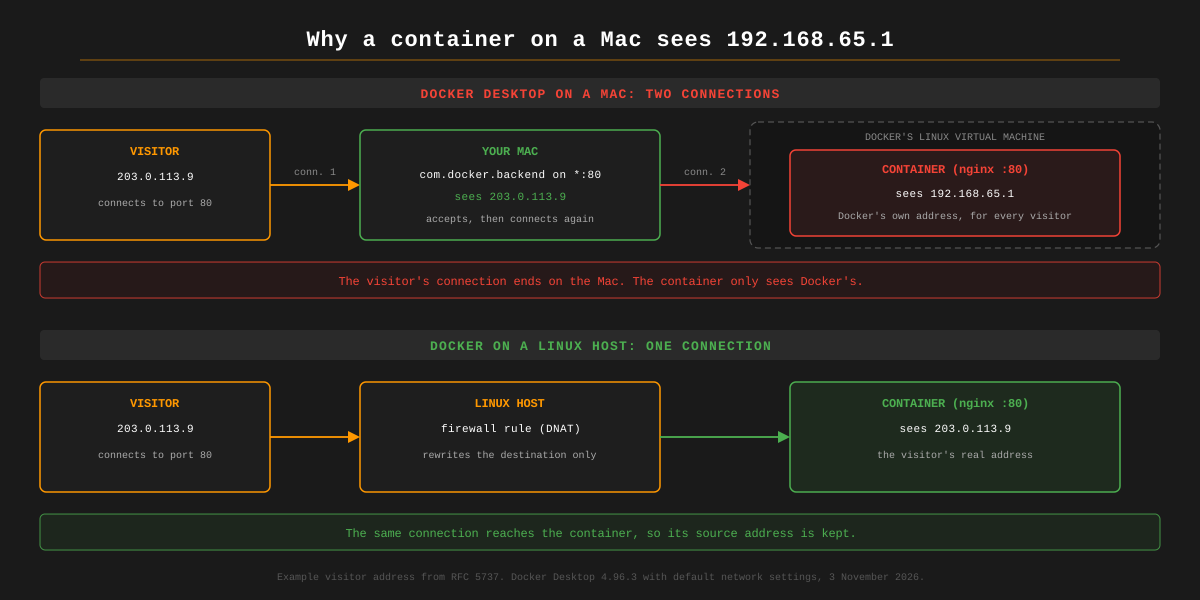
On a Linux host, Docker forwards a published port with a firewall rule (DNAT) that rewrites only the destination. The visitor's own connection reaches the container, and its source address comes with it.
What we saw on our Mac
We ran nginx in Docker Desktop with port 80 published, and connected to it from a server on the internet. The Mac and the container recorded the same request differently:
| Where we looked | Address it showed for the visitor |
|---|---|
The Mac: lsof -nP -iTCP:80 | the visitor's real address |
| nginx's access log in the container | 192.168.65.1 |
A second test on port 8080 got the same result over IPv6: nginx logged 192.168.65.1 for an IPv6 visitor too.
You can check your own setup the same way. While a connection is open, run this on the Mac:
lsof -nP -iTCP:80 -sTCP:ESTABLISHED
COMMAND PID USER FD TYPE DEVICE SIZE/OFF NODE NAME
com.docke 787 you 131u IPv4 0x... 0t0 TCP 192.168.1.20:80->203.0.113.9:52144 (ESTABLISHED)
The address after -> is the visitor. Then look at your container's log (docker logs <container>): if every line starts with 192.168.65.1, you're seeing the relay.
What it breaks
Anything inside the container that acts on the visitor's address sees one visitor:
- access logs and analytics;
- rate limiting, fail2ban and CrowdSec, which end up blocking
192.168.65.1, and with it everyone; - allowlists and geo-blocking;
- apps that record a login's IP address, such as Nextcloud and Vaultwarden.
Filtering that happens before traffic reaches your Mac, such as a firewall rule on your router, still works, because it never depends on the container.
Why no setting fixes it
The relay is how Docker Desktop reaches its virtual machine, so there's nothing to switch off.
- Docker's request to pass the original address to containers has been open since October 2020 as docker/roadmap#157.
- Docker's documentation says host networking in Docker Desktop 4.34 and later "works on layer 4". It doesn't say the client's address is kept, and we haven't tested it.
- OrbStack has the same limitation, open as orbstack#710. Its maintainer wrote in July 2025: "This is not expected behavior, but there are currently some internal limitations that make this hard to fix."
- We haven't tested Colima or Rancher Desktop.
Fixes that work
We tested the problem and the IPv6 behaviour on our own Mac. The proxy settings below are the standard ones from each project's documentation.
1. Run the service on macOS itself
A program running directly on macOS, installed from Homebrew or as a native app, accepts the visitor's connection itself and sees the real address, over IPv4 and IPv6, for TCP and UDP. Plex, Jellyfin, nginx, Caddy and most databases have native macOS builds.
It also covers UDP, such as game servers and VoIP, which the proxy fixes below don't.
2. A reverse proxy on the Mac, for websites
Run a reverse proxy directly on macOS, in front of the container. It accepts the visitor's connection, so it sees the real address, and passes it on in the X-Forwarded-For header.
- Publish the container's port on the loopback address only, so nothing can reach it without going through the proxy and fake the header:
services: web: image: nginx:stable-alpine ports: - "127.0.0.1:8080:80" - Run the proxy on the Mac. With Caddy, which adds
X-Forwarded-Forby default:brew install caddy caddy reverse-proxy --from :80 --to 127.0.0.1:8080 - Tell the app in the container to trust that header from Docker's address. For nginx, with its realip module:
set_real_ip_from 192.168.65.1; real_ip_header X-Forwarded-For;
macOS lets a program that isn't root listen on port 80 as long as it listens on all addresses, as Caddy does here with :80. Binding port 80 on one specific address fails with "permission denied" unless it runs as root.
3. The PROXY protocol, for other TCP services
For mail, databases and other TCP services that don't speak HTTP, a proxy such as HAProxy can put the visitor's address in a PROXY protocol header at the start of the connection. The service in the container has to support it: nginx (listen 80 proxy_protocol), Postfix and Dovecot do. Publish the container's port on 127.0.0.1 only, as in fix 2.
This doesn't help UDP.
4. Docker on Linux
Docker Engine on a Linux machine, or in a Linux virtual machine with bridged networking so it has its own address on your LAN, forwards published ports without a relay. Containers there see the real address.
Also check: is it published on IPv6?
A port published with an address, such as "0.0.0.0:80:80", makes Docker Desktop listen on IPv4 only. IPv6 visitors are refused before they reach the relay. Leave the address out:
services:
web:
image: nginx:stable-alpine
ports:
- "80:80" # IPv4 and IPv6. "0.0.0.0:80:80" would be IPv4 only
We tested both: with 0.0.0.0, IPv6 connections were refused; without it, docker ps showed the port on both 0.0.0.0 and [::], and IPv4 and IPv6 visitors both reached the container.
If your Mac is behind CGNAT and you're working out how visitors reach it at all, see how to use a Mac mini as a home server and self-hosting behind CGNAT.
Frequently Asked Questions
Why does my Docker container on a Mac see 192.168.65.1?
Docker Desktop runs containers in a Linux virtual machine. A Docker process on your Mac accepts each connection to a published port and opens a new connection into the virtual machine, so the container sees the address of Docker's side of that second connection, 192.168.65.1 with the default network settings. The visitor's address stays on the Mac.
Is 192.168.65.1 my router?
No. It's an address on Docker Desktop's internal network between your Mac and its Linux virtual machine. Your router and your LAN aren't involved. Every visitor to a published port shows up from it.
Does Docker Desktop's host networking fix it?
We haven't tested it. Docker's documentation says host networking in Docker Desktop 4.34 and later works at layer 4, and it doesn't say the client's address is kept. Docker's request to pass the original address to containers, docker/roadmap#157, is still open.
Does OrbStack show the real client IP?
No. OrbStack has the same limitation, tracked as orbstack#710. Its maintainer wrote in July 2025 that this is not expected behaviour, but that internal limitations make it hard to fix. We haven't tested Colima or Rancher Desktop.
Does Docker on Linux have the same problem?
Usually not. On a Linux host, Docker forwards published ports with firewall rules that rewrite only the destination, so the container sees the visitor's real address. The problem comes from Docker Desktop's virtual machine, which Linux doesn't need.
How do I get the real client IP in nginx on Docker Desktop for Mac?
Put a reverse proxy on the Mac itself, outside Docker, that adds the X-Forwarded-For header, and publish the container's port on 127.0.0.1 only. Then tell nginx to trust that header from Docker's address with set_real_ip_from 192.168.65.1 and real_ip_header X-Forwarded-For. Or run nginx directly on macOS.
Related guides
- How to use a Mac mini as a home server: setup, power, and how the internet reaches it
- How to expose Docker containers to the internet: the options, compared
- Self-hosting behind CGNAT: when your ISP blocks inbound connections